
You made a Suno song you actually want people to hear.
That is the fun part.
Then comes the next question: where should you share it?
A direct Suno link is fine for quick sharing. If you are sending a song to a friend, posting a casual reaction, or testing an idea, a link can be enough.
But if you are building an artist page, playlist, portfolio, fan hub, client demo, launch page, or music project, a plain link can start to feel unfinished.
The song might be good. The presentation just has not caught up yet.
Here are practical ways to share Suno songs outside of Suno, and when each option makes sense.
1. Share the Public Suno Link
The simplest option is to copy the public Suno song link and share it directly.
This works well for casual sharing, quick feedback, social posts, or private conversations where you do not need a polished landing page.
Use this when speed matters more than presentation.
The downside is that the listener leaves your environment. They are going to Suno, not to your artist page, portfolio, website, email signup, or broader project.
That may be fine. Just know what the link is doing.
2. Add the Song to Your WordPress Site
If you already have a WordPress site, this is often the best next step.
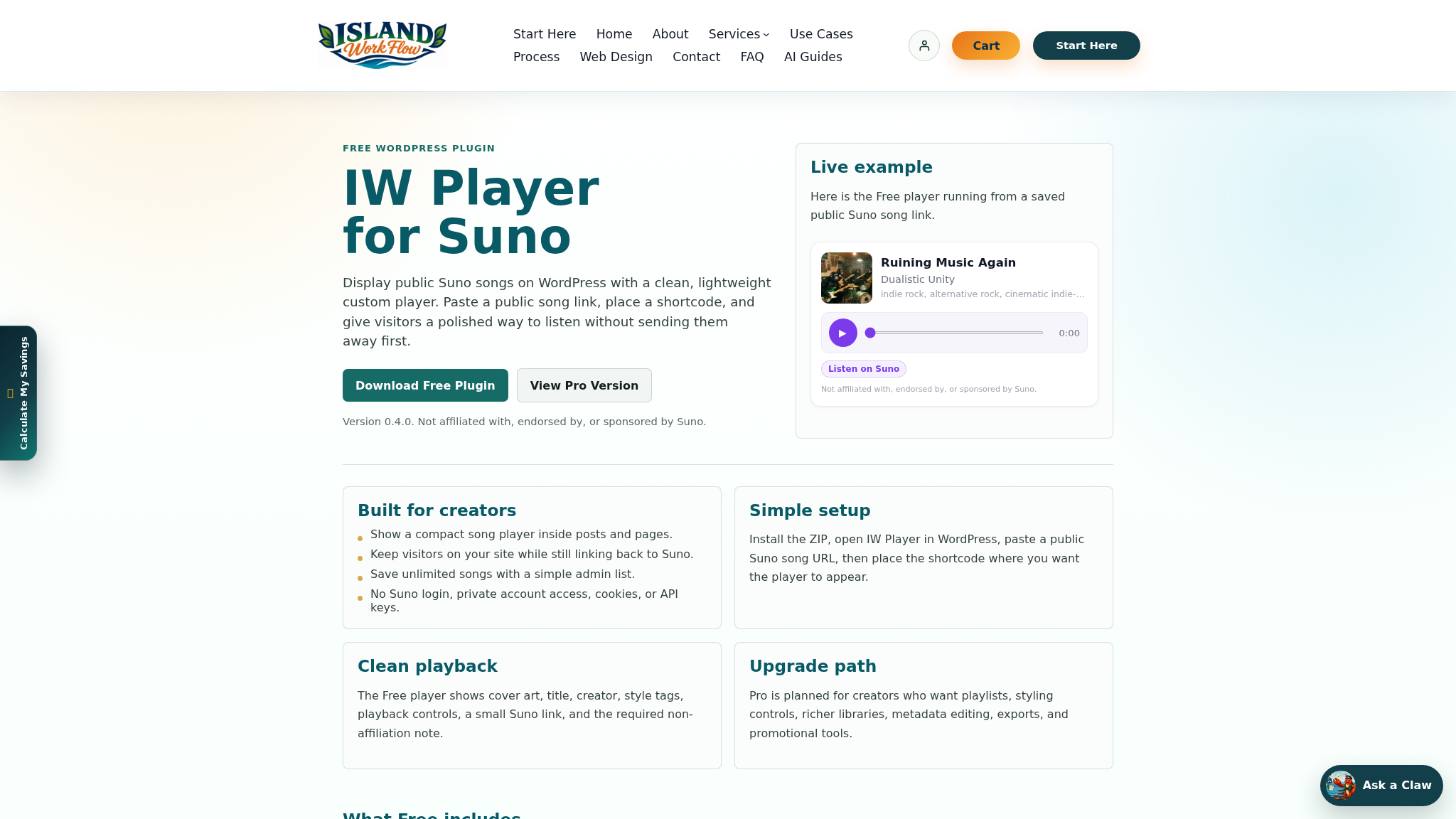
With IW Player for Suno, you can publish public Suno songs on your own WordPress site with a clean embedded player.
The free plugin is built for a simple public-link workflow. It lets you add public Suno song links to WordPress and display them in a cleaner on-page player.
That means visitors can listen while staying on your site.
This is useful for:
- AI artist pages
- Single-song landing pages
- Music portfolios
- Playlist pages
- Client demos
- Fan pages
- Blog posts about your creative process
- Small business music pages
No Suno API key is required for the basic public-link workflow. No Suno login is required for that basic workflow either.
3. Build a Dedicated Song Page
A song page gives one track a proper place to live.
Instead of sending people straight to a standalone link, you can create a page with the embedded player, cover art, lyrics, notes, related songs, and a clear next step.
A song page is useful when you are promoting one track from social media, email, YouTube, TikTok, Instagram, Reddit, or LinkedIn.
It also helps if the song has a story behind it.
A good song page might include:
- The embedded player
- A short description of the song
- Lyrics or prompt notes
- Cover image or visual concept
- Related tracks
- A newsletter signup
- A contact button
- Links to your other work
The goal is not to overbuild the page. The goal is to make the song feel intentional.
4. Create a Playlist or Collection Page
If you have several Suno songs, a playlist page may be better than several separate links.
Group songs by mood, genre, project, use case, or album idea.
For example:
- Podcast intros
- Brand jingles
- Rock demos
- Comedy songs
- Cinematic themes
- Client concepts
- Album drafts
- Short-form content ideas
A playlist page helps people understand your range. It also makes the listening experience feel less random.
5. Share the Page on Social Platforms
Once your song has a home, share the page instead of only sharing the original Suno link.
This is useful on LinkedIn, Facebook, X, Reddit, Quora, Bluesky, Mastodon, and other communities where context matters.
The post can still be simple.
I made this track in Suno and built a quick page around it with lyrics, notes, and a player. Would love feedback on the song and the presentation.
That kind of post gives people a reason to click beyond curiosity.
6. Use Short-Form Video to Send People to the Song
Short-form video works well when the song has a strong hook, mood, or visual idea.
You can create a 10 to 30 second clip with a visual, caption, and call to action. Then link to the song page or your website profile where the full track lives.
This can work on YouTube Shorts, TikTok, Instagram Reels, and Facebook Reels.
The key is to avoid making the video feel like a generic ad. Use the emotional reason someone would care: the song is funny, cinematic, strange, catchy, personal, useful, or part of a larger project.
7. Add It to an Email or Newsletter
Email is underrated for music sharing because it gives you a direct line to people who already chose to hear from you.
If you have a newsletter, link to the song page and include a short note about why you made the track.
A simple format works:
- One sentence about the song
- One sentence about how or why you made it
- A link to listen
- One question for feedback
This is especially useful if you are building a fan list, client list, or creator audience.
8. Use Traditional Music Platforms Carefully
Depending on your Suno plan, rights, and distribution goals, you may also consider uploading music to platforms such as SoundCloud, Bandcamp, Spotify, YouTube, or other music services.
This can make sense if you are treating the song as a release, but it is not always the first step.
Before distributing or monetizing AI-generated music, check the relevant Suno terms for your account, the rules of the platform you are uploading to, and any rights or disclosure requirements that apply.
This article is not legal advice. The practical point is simple: make sure you understand what you are allowed to do before turning a song into a commercial release.
Why Your Own Website Matters
The biggest advantage of your own website is context.
On your own site, you control what appears around the song. You can explain the project, collect emails, link related work, invite feedback, or send people to a next step.
That matters because people are not only deciding whether they like a song. They are deciding whether the project feels real.
A plain link can feel disposable.
A good page can make the same song feel more finished.
A Simple Sharing Workflow
If you are not sure where to start, use this workflow:
- Make sure the Suno song is public.
- Create a page for the song or playlist on your WordPress site.
- Add the public Suno song link with IW Player for Suno.
- Add a short description, artwork, lyrics, or notes.
- Publish the page.
- Share that page on social, email, and creator communities.
That gives the song a home before you start promoting it. For a more focused setup walkthrough, see How to Embed Suno Music on WordPress.
Download the Free Plugin
If you want to share public Suno songs outside of Suno and publish them on your own WordPress site, start with IW Player for Suno Free.
It is built for creators who want a clean embedded player for public Suno song links without a complicated technical setup.
Download IW Player for Suno Free
A Note About Suno and Public Links
IW Player for Suno works with public Suno song links as they are available today.
Island Workflow actively maintains its tools where there is demand, but third-party platform behavior can change. A plugin can help you publish public Suno songs on WordPress, but it cannot control Suno’s future features, platform changes, media availability, or third-party behavior.
IW Player for Suno is made by Island Workflow. It is not affiliated with, endorsed by, or sponsored by Suno.
Final Thought
Sharing a Suno song is easy.
Presenting it well takes a little more intention.
If you made something you are proud of, do not let it live only as a loose link. Give it a page, a story, and a place where people can listen without leaving your world immediately.
That is how a song starts to feel like part of a real project.

 Island Workflow